

Your 24/7 document intelligence command center — the daily flood of documents and attachments, handled.
What it does
Four things AutoDoc takes off the desk.
Document Intake & Organization
As soon as a document comes in — by email, scan, or upload — AutoDoc instantly sorts it into the right case or client file. Large files like medical records are automatically split and labeled.
Smart Data Extraction
Names, dates, billing amounts, and policy information are integrated directly into your system — eliminating manual entry and reducing errors.
Automated Filing & Workflow
Documents are saved using your firm’s naming conventions, then next steps fire automatically — alerts, tasks, calendar updates.
Goodbye Manual Work
No more renaming files, entering data, or tracking documents. Everything is organized, extracted, and stored.
In depth
Automate the Paperwork That Slows Your Firm Down
AutoDoc IDP automatically handles the daily flood of documents and email attachments so your team doesn’t have to.
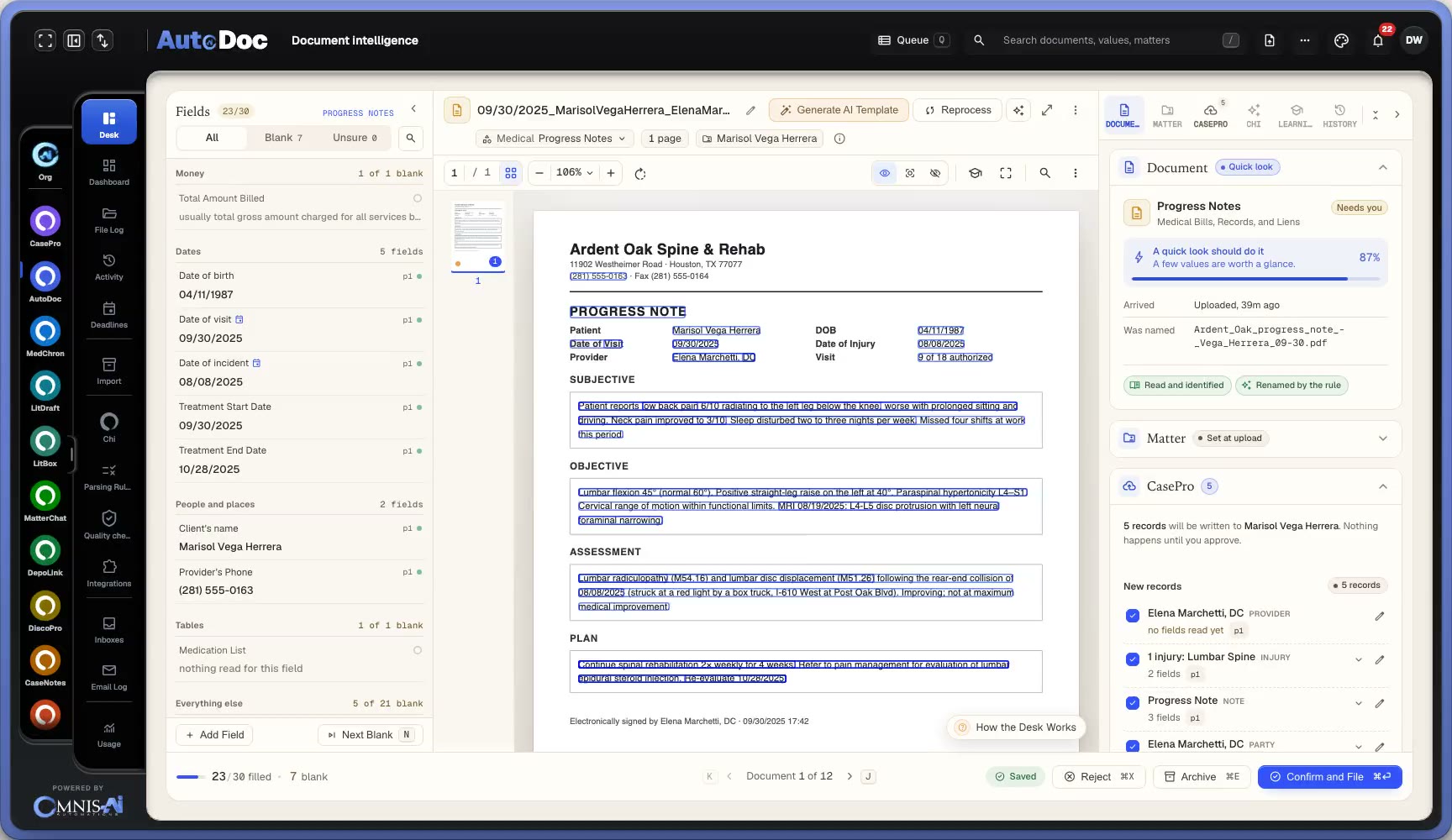
Document Intake & Organization
As soon as a document comes in (whether by email, scan, or upload), AutoDoc IDP instantly sorts and organizes it into the right case or client file. Large files, such as medical records or court packets, are automatically split and labeled for easy navigation.
Smart Data Extraction
Essential details such as names, dates, billing amounts, and policy information are seamlessly integrated directly into your system. This process eliminates the need for manual entry and significantly reduces the potential for errors.
Automated Filing & Workflow
Documents are saved to the correct folder using your firm’s naming conventions. The system also kicks off next steps like sending alerts, assigning tasks, or updating calendars all handled automatically.
Goodbye Manual Work
With AutoDoc IDP, you no longer have to waste time manually renaming files, entering data, or tracking documents. Everything is automatically organized, extracted, and stored so your team can focus on meaningful work.
AutoDoc, by the numbers
- 57 secs
- to process 270 pages
- 0
- manual data entry
- 100%
- audit trail
- 87%
- less processing time
The intelligence layer
From inbox to filed, without a hand on it.
Rapid Ingestion
Capture documents from emails, court portals, scanners, faxes, and bulk uploads in seconds. Automatically splits multi-document files, removes duplicates, and prioritizes by urgency—no manual sorting required.
Smart Classification
Recognizes what each document is — medical records, bills, court notices, correspondence — and files it under the right type and the right matter.
Field-Level Extraction
Automatically extracts 200+ data fields—case numbers, deadlines, names, codes, billing amounts, provider details—with confidence scoring. Ready for your CRM in seconds, not hours.
Seamless Routing
Sends structured data directly to CasePro CRM, Salesforce, NetDocuments, billing systems, and your existing case management apps.
Audit-Ready Compliance
Enterprise-grade security with SOC 2 Type I, HIPAA compliance readiness. Every document action is logged with immutable audit trails, and encryption in transit and at rest.
Inbox pipelines
One address per pipeline, each with its own rules.
One-Click Inbox Creation
Generate custom email addresses instantly—no IT required. Each inbox is a dedicated pipeline with its own processing rules and routing logic.
Custom Parsing Rules
Configure each inbox to recognize specific document types, extract relevant fields, and route to the right systems—all tailored to that pipeline's needs.
Automated Workflows
Set up complete automation per inbox: auto-classify documents, extract data, trigger notifications, file to specific folders, and populate different CRM fields.
intakes@omnis-mail.com
New client documents → Auto-creates case records in CRM → Routes to intake team
medical@omnis-mail.com
Medical bills & records → Extracts provider data & charges → Sends to damages tracking
discovery@omnis-mail.com
Discovery documents → Auto-indexes by request number → Routes to DiscoPro or case folder
court@omnis-mail.com
ECF notices & court orders → Extracts deadlines → Creates calendar entries & alerts attorneys
billing@omnis-mail.com
Invoices & expenses → Extracts amounts & vendors → Syncs to QuickBooks
On the record
The questions firms ask about AutoDoc.
Does AutoDoc work with our existing case management system?
Yes. AutoDoc integrates seamlessly with leading case management tools through direct APIs or via Zapier/Make connections. Whether you use CasePro, Clio, or a custom-built CRM, AutoDoc automatically syncs extracted data like case numbers, deadlines, and billing details to the correct fields—no manual entry required.
How does AutoDoc handle sensitive client data and PHI?
AutoDoc is built for legal and healthcare environments with SOC 2 Type I certification and HIPAA compliance for protected health information (PHI) in medical-legal cases. Security features include encryption in transit and at rest, role-based access controls (RBAC) so only authorized users see specific documents, multi-factor authentication (MFA) for all user accounts, and immutable audit trails tracking every document action (who accessed what, when, and what changes were made). Every document, extraction, and user action is logged with timestamps and user IDs—perfect for compliance audits, malpractice defense, or regulatory investigations. You can export audit reports at any time in standard formats. AutoDoc meets or exceeds the security requirements of the most risk-averse law firms and insurance companies.
Can AutoDoc handle our firm’s unique document types and custom fields?
Absolutely. AutoDoc’s AI adapts to your workflows using custom parsing rules that you define. You can train the platform to recognize specific document types, extract custom fields like lien amounts or medical provider names, and route data to unique case folders or CRM fields—without writing a single line of code.
How long does it take to set up, and do we need IT support?
Setup takes less than an hour. AutoDoc’s onboarding wizard helps you connect inboxes, define parsing rules, and integrate your case systems—all with guided steps. No IT intervention is required; our support team is available for assistance if you’d like help configuring advanced automations.
What happens when AutoDoc isn’t confident about extracted data?
When AutoDoc encounters uncertain data, it flags those fields for human review instead of guessing. Each flagged item appears in the validation dashboard, where your team can confirm or correct the data in one click. The system learns from every correction—improving accuracy continuously over time.
Works with
Sharper beside the rest of the system.
AutoDoc shares one record with every other Omnis product. These are its nearest neighbours in the Flow & Creation center and beyond.



Next step
Put AutoDoc to work at your firm.
AutoDoc is in early access. Add your firm to the list and we will be in touch — or talk to us now.