

Discovery responses, motions, and demands drafted in minutes — jurisdiction-compliant.
What it does
Four things LitDraft takes off the desk.
Automated Discovery Responses
200+ interrogatories that normally take weeks become complete responses in 12 minutes — fast, compliant, stress-free.
Smarter Demand Packages
Polished demand packages with medical summaries built in for stronger negotiation leverage.
Jurisdiction-Specific Pleadings
Over 600 jurisdiction-specific templates, meticulously formatted and ready for filing.
Client-Friendly Q&A
ClientQ simplifies gathering client answers so discovery stays on track.
In depth
Discovery & Legal Documents That Write Themselves
Generate complete discovery responses, motions, and demands in minutes—with jurisdiction-specific compliance and built-in strategic objections.
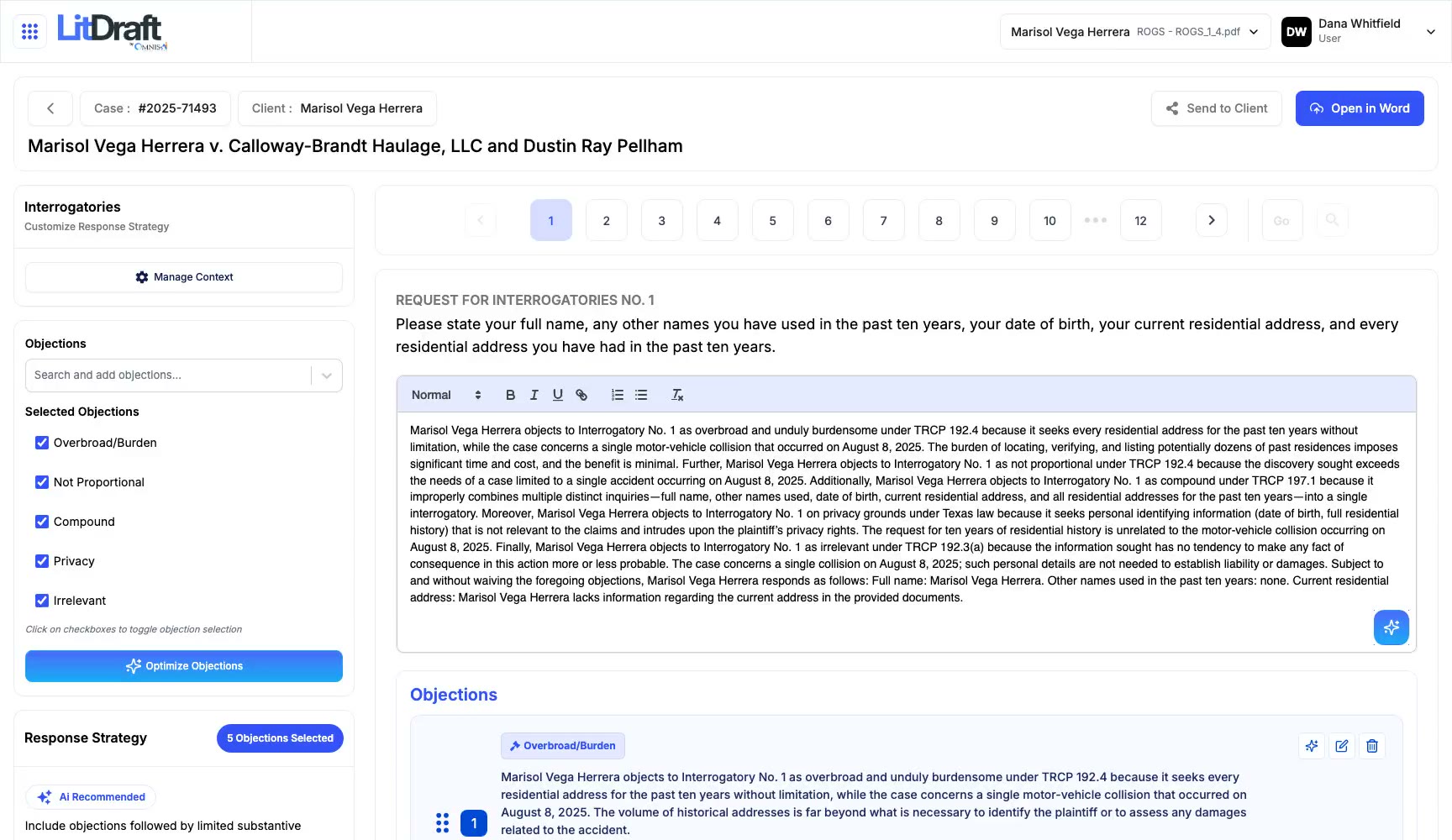
Automated Discovery Responses
Opposing counsel may dump 200+ interrogatories, which normally take weeks to draft. LitDraft automates discovery so firms generate complete responses in just 12 minutes—fast, compliant, and stress-free.
Smarter Demand Packages
Manual demand drafting slows settlements and misses critical details. LitDraft creates polished demand packages with medical summaries built-in, ensuring clarity and stronger negotiation leverage.
Jurisdiction-Specific Pleadings
Using outdated or incomplete templates can lead to serious compliance issues and missed deadlines. LitDraft’s extensive pleading library features over 600 jurisdiction-specific templates, all meticulously formatted and ready for filing.
Client-Friendly Q&A
Gathering client answers can often be a frustrating experience that delays overall progress. However, LitDraft’s innovative ClientQ technology simplifies the process, enabling clients to provide accurate responses and ensuring that discovery stays on track.
LitDraft, by the numbers
- 12 mins
- to draft discovery
- 95%
- less drafting time
- 100%
- rule compliance
- 0
- missed objections
The drafting engine
How a complete, compliant draft comes together.
Instant Discovery Generation
Upload opposing counsel's requests and get fully-drafted responses with surgical precision-complete with objections, privilege assertions, and substantive answers in under 60 secs.
Context-Aware Intelligence
Feed LitDraft your complaint, answer, medical records, and case documents. Watch it craft responses that actually reference your specific facts, injuries, and legal theories—not generic filler.
Jurisdiction Mastery
From California's strict meet-and-confer requirements to Texas's broad discovery rules—LitDraft knows every local rule, citation format, and procedural quirk across all 50 states.
Strategic Objection Engine
One-click access to battle-tested objections carefully tailored to your jurisdiction. AI intelligently suggests which objections apply based on the request’s content and your overall case strategy.
ClientQ Translation Magic
Our ClientQ feature auto-translates complex legalese into plain English for your clients, then seamlessly maps their plain-language responses back into formal legal drafts. No more endless client calls explaining what 'interrogatory' means.
The platform
Everything LitDraft does for a litigation team.
Discovery Response Automation
Upload any discovery PDF and auto-extract every RFP, RFA, ROG, and RFD. Feed in your complaint, answer, or any case document for context-aware responses. Generate responses in seconds using your case-specific knowledge base. Maintain perfect formatting, numbering, and local rule compliance—every time.
Propounded Discovery Generator
Upload your complaint/petition to auto-generate targeted discovery sets. Access 600+ customizable templates by case type and jurisdiction. Create defendant-specific discovery that actually moves your case forward. Automatic compliance with local rules, citations, and formatting standards.
Smart Objection & Response Management
One-click insertion from jurisdiction-specific objection banks. AI recommends tailored objections based on request analysis and case type. Track objection patterns to strengthen your defensive strategy. ClientQ translates legalese to plain English, then maps client responses back to legal language.
Client-Facing Discovery Portal
Send clients a set of simplified discovery questions through SMS or secure email to ensure they can easily respond. Collect responses in plain English from any device, allowing for real-time interaction and feedback. Automatically convert the answers provided into well-formatted legal responses in an instant, streamlining the process. Effortlessly track replies, capture eSignatures, and send reminders automatically to keep everything organized.
Advanced eSignature Workflow
Create comprehensive signature-ready packets that comply with HIPAA regulations, CMS requirements, and necessary verifications. Utilize AI-powered drag-and-drop tools to effortlessly prefill fields with relevant case data, streamlining your workflow. Route documents to several signers for signing orders to ensure a smooth and organized signing process. Automatically stamp signed documents with Bates numbering while ensuring complete audit trails for thorough record-keeping.
Professional Production Engine
One-click Bates stamping with custom prefixes, positioning, and sequence control. Continuous numbering maintained across DiscoPro, LitDraft, and CasePro. Auto-generate production sets with cover letters, notices, and detailed index files. Export in court-required formats with privilege logs and redaction summaries.
Redaction & Document Review Integration
Seamlessly access redacted documents from DiscoPro's Redaction Folder. Tag documents for redaction, attorney review, or signature needs. Intelligent routing based on tags—automatically queue documents for appropriate action. Maintain version control with complete redaction history.
Enterprise Template & Document Management
Intelligent Template Generation Engine that follows your firm's standards and formatting. Create dynamic templates that adapt by case type or jurisdiction. Draft faster with a drag-and-drop builder, logic, and merge tags. Collaborate with colleagues through notes, roles, and edit history.
Intelligent Tagging & Workflow Automation
Apply multi-dimensional tags: document type, stage, party, RFP number, action required. AI auto-suggests tags based on metadata and content patterns. Smart automations trigger based on tags (e.g., 'Needs Signature' → Client queue). Create custom workflows for your firm's unique processes.
Real-Time Case Insights & Analytics
Monitor dashboards showing document gaps, delays, and risks. Track progress, client response rates, and time saved per case. Export audit-ready logs and usage summaries in seconds. Forecast completion dates with AI-powered performance trends.
Enterprise-Scale Infrastructure
Secure data with role-based permissions and access controls. Easily scale your operations to accommodate from solo practitioners to large firms with over 500 attorneys. Sync work across devices with offline-ready cloud access. Ensure compliance with tamper-proof logs and audit trails.
On the record
The questions firms ask about LitDraft.
What types of legal documents can LitDraft generate?
LitDraft automates the creation of discovery responses, motions, and demand packages — all tailored to your jurisdiction’s rules. It also includes a library of 600+ pre-vetted pleading templates covering everything from interrogatories to settlement demands.
How accurate are the documents created by LitDraft?
Every document is generated using AI trained on jurisdiction-specific formats and real legal data. Built-in validation checks and auto-citations ensure each draft meets court standards, minimizing review time and formatting errors.
Can LitDraft integrate with my existing case management system?
Yes. LitDraft connects seamlessly with CasePro CRM and other major case management tools. This ensures your discovery responses, pleadings, and client data stay synchronized — without duplicate uploads or manual entry.
Will LitDraft replace my legal team?
Not at all. LitDraft enhances your team’s productivity by handling time-consuming drafting work, freeing attorneys and paralegals to focus on strategy, review, and case outcomes — not repetitive document prep.
How much time can I realistically save using LitDraft?
Firms typically complete full discovery responses in under 12 minutes — a process that used to take days. Across cases, LitDraft users report an average 80–90% reduction in drafting time.
Works with
Sharper beside the rest of the system.
LitDraft shares one record with every other Omnis product. These are its nearest neighbours in the Voice & Testimony center and beyond.

Next step
Put LitDraft to work at your firm.
LitDraft is in early access. Add your firm to the list and we will be in touch — or talk to us now.